
Logitech K400 Plus Review: The Couch Potato King
Logitech K400 Plus Review. The $25 keyboard you buy for your TV and exclude from your will. Mushy keys, terrible trackpad, but absolutely essential.
This page contains affiliate links. If you buy through them, Pretentious Reviews may earn a commission.
The Verdict
The Good
- Undisputed, slumping king of the couch-potato kingdom
- Battery life measured in geological eras (18 months)
- Lightweight enough to be used as a frisbee by your toddler
The Bad
- Fisher-Price plastic feel that dissolves on contact with joy
- No backlight for your midnight Netflix doom-scrolling
- Trackpad is slippery and erratic like your life choices
The Living Room Battlefield
The modern living room is a battlefield of interfaces. We have remotes with voice search that never works, phone apps that disconnect when the screen locks, and game controllers that make typing a password feel like defusing a bomb. The specific hell of trying to type “The Grand Budapest Hotel” into a search bar using a D-pad is a struggle Sisyphus would recognize. The K400 Plus exists to solve this friction. It promises the power of a desktop inputs—pointer and QWERTY—in a form factor that can slide under a coffee table.
The Fisher-Price Aesthetic
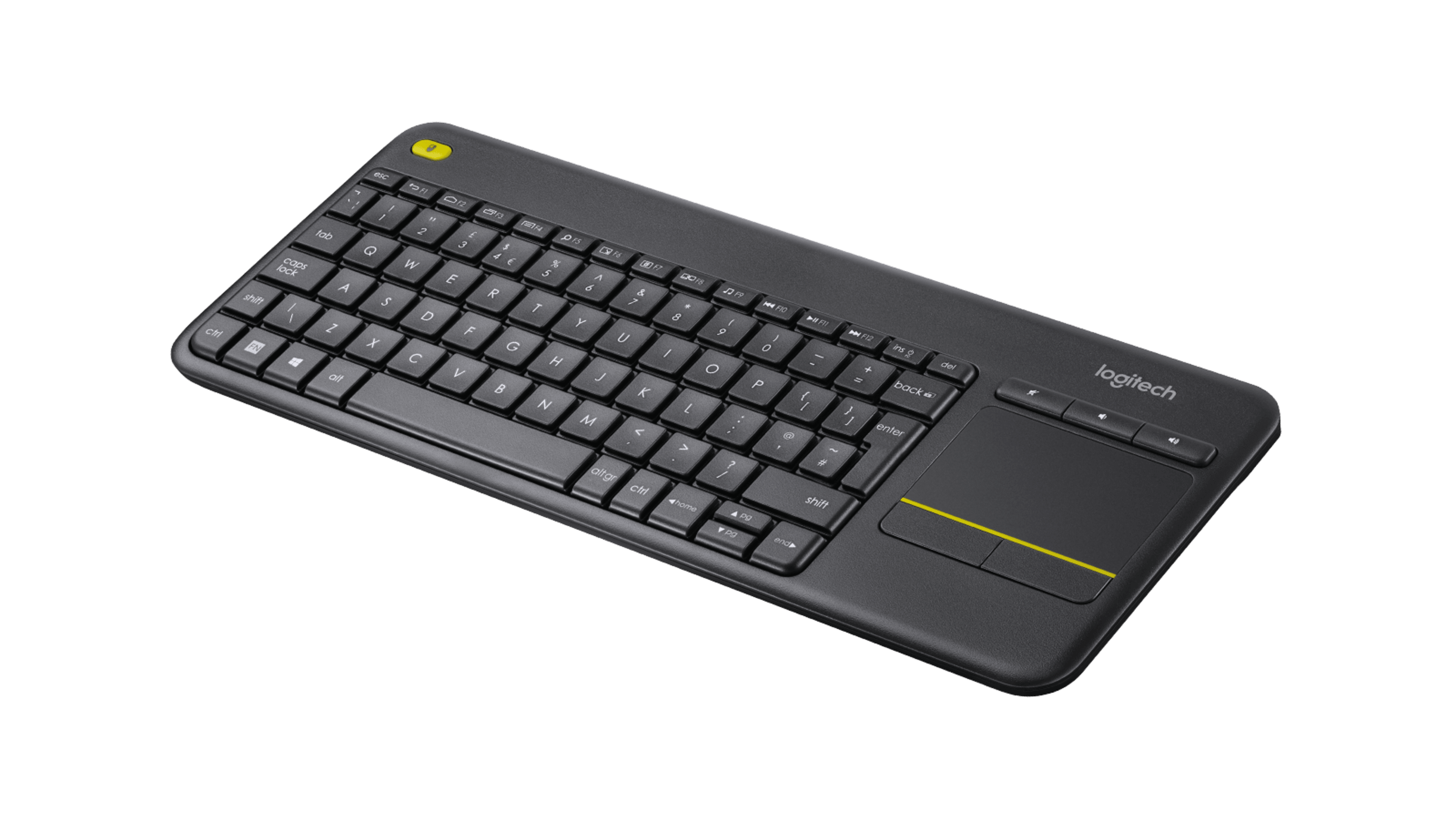
To hold the K400 Plus is to hold the very concept of “cost-cutting.” The chassis is made of a grey, varying-texture plastic that feels hollow, like an easter egg waiting to be cracked. There is no density here, no reassuring weight. It is light enough to be thrown by a toddler, which is perhaps a design requirement.
The keys themselves are keycaps in name only. They are shaky, membrane chiclet tiles that rattle in their housings. The yellow accent strip on the top left (acting as a left-click button) is the only splash of visual interest, a utilitarian stripe that screams “construction equipment.” It does not look like technology; it looks like an accessory for a Fisher-Price office set.
The Price of Adequacy
At $39.99, the K400 Plus is priced exactly correctly. Any cheaper, and it would likely dissolve on contact with oxygen. Any more expensive, and one would demand features like, say, a backlight.
For the price of a decent bottle of bourbon, you get a wireless input device that will likely outlive your current PC. In the grand lexicon of peripherals, it is the Toyota Corolla of keyboards—unexciting, ubiquitous, and aggressively adequate. High-end media keyboards like the Corsair K83 Wireless have largely vanished, leaving the K400 Plus as the undisputed, slumping king of the couch.
The Dark Room Struggle
The first time you use the touchpad, you will feel a distinct lack of friction—and not in the good way. It is distinctively slippery. But the real friction is the lack of light. This is a device designed for the living room, a space we typically inhabit in the dark. Yet, the keys are unlit.
Navigating Netflix credentials in a dim room requires tilting the board toward the TV glow, a maneuver that makes you look like you are decoding ancient runes. It is a baffling omission, a failure of imagination that reminds you, constantly, that you didn’t pay enough for the luxury of LEDs.
The Mushy Compromise
Typing on the K400 Plus is an exercise in compromise. The keys are slightly smaller than standard, crammed together in a layout that invites typos. The travel is shallow and “mushy”—a word often overused in tech criticism, but here, it is literal. Determining if a key press has actually registered is a guessing game.
Building a workstation? Don’t use this. For serious typing, the Logitech MX Keys S is the gold standard (and priced accordingly).
Read ReviewHowever, the ergonomics of the concept work. Being able to lean back, keyboard on knees, and thumb-navigate the cursor is a liberation. It transforms the PC from a workstation into an entertainment appliance. You forgive the terrible keys because you are not writing a novel; you are searching for “Succession.”

The Immortal Plastic
Despite its cheap feel, the K400 Plus is surprisingly immortal. The plastic, flexible as it is, absorbs impact well. Dropping it from the armrest to the hardwood floor usually results in nothing more than a battery cover popping off. Speaking of power, the claim of 18-month battery life is reliable. It sips energy with the frugality of a desert cactus. You will likely lose the proprietary Unifying Receiver dongle before you need to change the two AA batteries.
The Dongle Life
It runs on the Logitech Unifying protocol. It is plug-and-play in the truest sense. There is software (Logitech Options), but installing it feels like overkill, like putting a spoiler on a lawnmower. The most you will do is disable the “tap to click” feature, which is notoriously jittery.
The Love-Hate Relationship
The internet has a love-hate relationship with this plastic slab. Users on r/htpc treat it as essential kit, praising its lightweight portability and the fact that the battery “lasts forever.” It is the standard-issue equipment for the home theater enthusiast.
However, the complaints are uniform and loud. The lack of backlighting is a universal grievance. Reviewers frequently lament the “cramped” keys, noting that prolonged typing causes hand cramping. RTINGS points out the “flexing” build quality, calling it unfit for heavy typing. There is also a recurring thread of users annoyed by the trackpad’s scrolling, which can be jumpy and erratic, making smooth web browsing a test of patience.
Continue Your Judgment

Logitech MX Keys S Review: The Office Standard
Logitech MX Keys S Review. The default keyboard for anyone with a job. Heavy, premium, and boringly perfect. If you use Excel, you probably own this.

Logitech Signature Slim Solar+ K980 Review: Never Charge, Never Impress
The Logitech Signature Slim Solar+ K980 eliminates charging cables but sacrifices everything else. A sustainability story with trade-offs.

Logitech Wave Keys Review: The Gateway Drug
A review of the Logitech Wave Keys. It's affordable and comfortable, but the mushy keys and lack of pro ergonomics holding it back from greatness.

Logitech Ergo K860 Review: The Wrist Savior
Logitech Ergo K860 Review. A split ergonomic keyboard that forces you to type correctly. Great for your wrists, terrible for your ego. No backlight, $130.