
Keychron K5 Pro Review: Wired Spreadsheet Master
The Keychron K5 Pro is a glorious 100% mechanical keyboard that’s tragically held back by 2015-era Bluetooth. Great for wires, bad for freedom.
This page contains affiliate links. If you buy through them, Pretentious Reviews may earn a commission.
The Verdict
The Keychron K5 Pro is the kind of product that makes me drink. It does so much right—it’s impossibly thin, it’s built like a tank, and it finally brings QMK/VIA customization to the low-profile world. For office drones who need a Numpad to feel alive, it’s almost perfect. It looks premium, it feels expensive, and it types like a dream compared to that mushy membrane garbage IT gave you.
But then you unplug it. And the dream dies. The Bluetooth latency is so bad I had enough time to contemplate my life choices between pressing a key and seeing the letter appear. It’s a wireless keyboard that demands a wire. If you’re a Mac user glued to your desk, buy it. If you’re a gamer or someone who values their sanity, run away. It’s a solid 8/10 keyboard trapped in a 4/10 wireless experience.
The Good
- Rigid enough to be used as a blunt weapon
- QMK/VIA for the productivity master
- Types better than your IT-issued garbage
The Bad
- Wireless performance from a bygone era
- Greasy-feeling keycaps for the unwashed
- Stabilizers clatter like a skeleton's teeth
The Need for Speed
You buy this keyboard because you’re insecure. You want people to look at your desk and think, “Wow, that guy crunches numbers and appreciates fine engineering.” You want the clicky-clack superiority of a mechanical board without looking like a virgin who plays Valorant in his basement. You want the Numpad because you’ve convinced yourself you use Excel enough to justify it. (Spoiler: you don’t). The K5 Pro is furniture for your ego.
The Big Brick
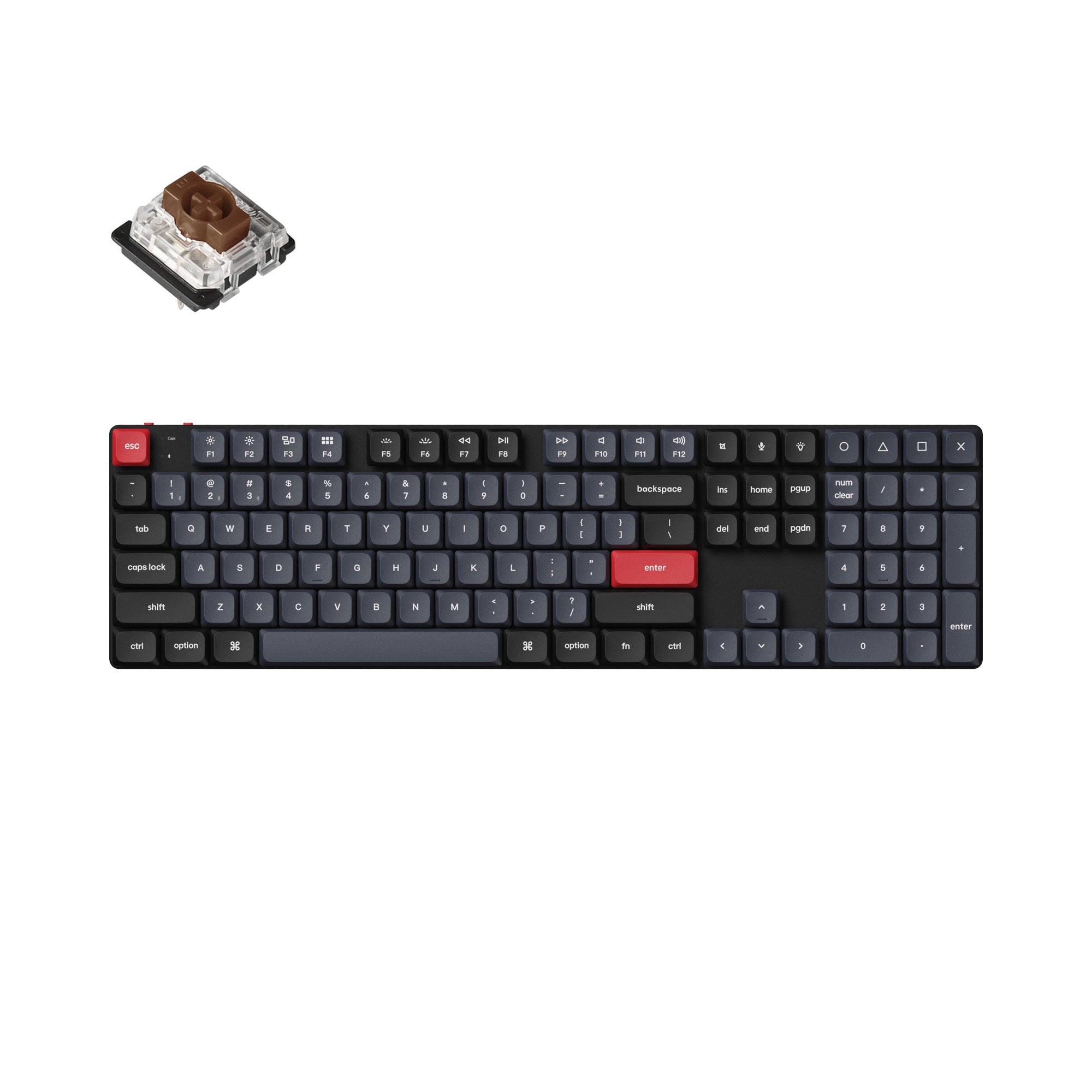
Physically, this thing is actually impressive. It’s a slab of aluminum that feels like it could survive a nuclear blast, or at least a spilled latte. It’s heavy—720g of “I cost more than your Logitech.” The ultra-slim profile means you don’t need a wrist rest, which is good because wrist rests are for weaklings. It flatters your desk. It says, “I have taste.” It’s a lie, of course, but a pretty one.
Considering the Logitech Alternative? If you want the gold standard for office productivity (and don’t mind membranes), read our review of the Logitech MX Keys S.
Read ReviewThe Punishment
The friction comes when you try to use it as advertised. The “wireless” part of the name is a cruel joke. Pairing it with a Mac is like trying to explain NFT utility to your grandmother—painful, confusing, and ultimately futile. And if you’re on Windows, good luck getting the VIA software to recognize it without installing drivers that look like they were coded in 1998. It’s supposed to be “Pro,” but it feels like a beta test.
The Daily Drive
When it works (wired), it’s delightful. The Gateron low-profile switches are snappy and satisfying. I used the Browns, and they have just enough tactile bump to let you know you’ve done something, without sounding like a machine gun. But the stock keycaps? Slippery. Oily. They feel like cheap ABS even though they claim to be PBT. Your fingers slide off them like hope sliding off my soul.
Confused by plastic types? Learn why “ABS” shine is the enemy of happiness in our guide to PBT vs ABS keycaps.
Read GuideThe Material Reality
Here’s the thing: for ~$119, you get a lot of metal. The top plate is aluminum, the bottom is plastic, but it doesn’t flex. It’s rigid. It’s a weapon. Most low-profile boards feel like toys; this feels like a tool. But that rigidity comes at a cost—the stabilizers on the big keys (Space, Enter) rattle like a skeleton in a dryer. It’s not “thocky,” it’s “clacky.” There is a difference, and if you don’t know it, you deserve this keyboard.
The Software That Hates You
QMK and VIA are legendary for a reason—they are powerful. You can remap any key to do anything. Want to make your Caps Lock key launch a nuclear missile? You probably can. But on the K5 Pro, accessing that power is a chore. The web-based launcher is great when it loads, but half the time it just stares at you blankly. It’s powerful customization for people who have the patience of a saint, which I do not.
> Specs
- Dimensions 435 x 120 mm
- Weight 720g
- Switch Type Gateron Low Profile Mechanical
- Battery 2000 mAh
- Polling Rate 1000Hz (Wired) / 90Hz (Wireless)
- Connectivity Bluetooth 5.1 & Wired USB-C
Community Consensus
The online community is generally pleased with the K5 Pro as a specialized tool, but frustration with its wireless performance is a recurring theme.
Reddit (r/Keychron & r/MechanicalKeyboards) users frequently report Bluetooth instability (Thread). Multiple users cite intermittent disconnects and noticeable input lag, particularly on macOS, with some resorting to wired-only use to avoid frustration.
Reddit threads also highlight Quality Control concerns regarding key chatter (Search). A minority of users experienced keys double-typing or failing to register within the first year, which is disappointing for a “Pro” model.
YouTube reviewers and commenters praise the typing feel and build quality (Search). The transition to PBT keycaps and the rigid aluminum frame are universally seen as major upgrades over the original K5.
Reddit users are divided on the value of the RGB backlighting (Thread). While the effects are smooth, the non-shine-through keycaps mean the legends are invisible in the dark, leading many to question the utility of the RGB version over the White Backlight one.
Keychron Official Groups (via Reddit) discuss VIA compatibility issues (Thread). Some Windows users struggle to get the browser-based VIA to detect the board without specific driver updates, contrasting with the “plug and play” marketing.
Continue Your Judgment

Keychron K17 Pro Review: The DIY Kit
Great 96% layout and QMK support ruined by poor stabilizers. Is the Keychron K17 Pro worth the DIY fix?

Lofree Flow 2 Review: The Pretty Paperweight
The Lofree Flow 2 offers the best low-profile typing feel on the market, but its software and connection issues make it a frustrating premium experience.

NuPhy Air96 V2 Review: The Low-Profile King Returns
With QMK/VIA, 1000Hz wireless, and acoustic upgrades, the NuPhy Air96 V2 isn't just a travel keyboard—it's a desktop replacement.

Keychron B6 Pro Review: The Boring Budget King?
Keychron B6 Pro Review. A $40 wireless slab of plastic that mimics apple for generic brand prices. Competent, cheap, and utterly devoid of soul.